See who sends mail as your domain
Anyone can put your domain in the From line of an email. DMARC reports show who does. One Bit Mail collects them for each domain and explains them in plain words, right on the domain's page.

What it does
Reports collected for you
Your DMARC record sends the daily reports from large mailbox providers to us, and they appear on the domain's page. No mailbox full of XML files.
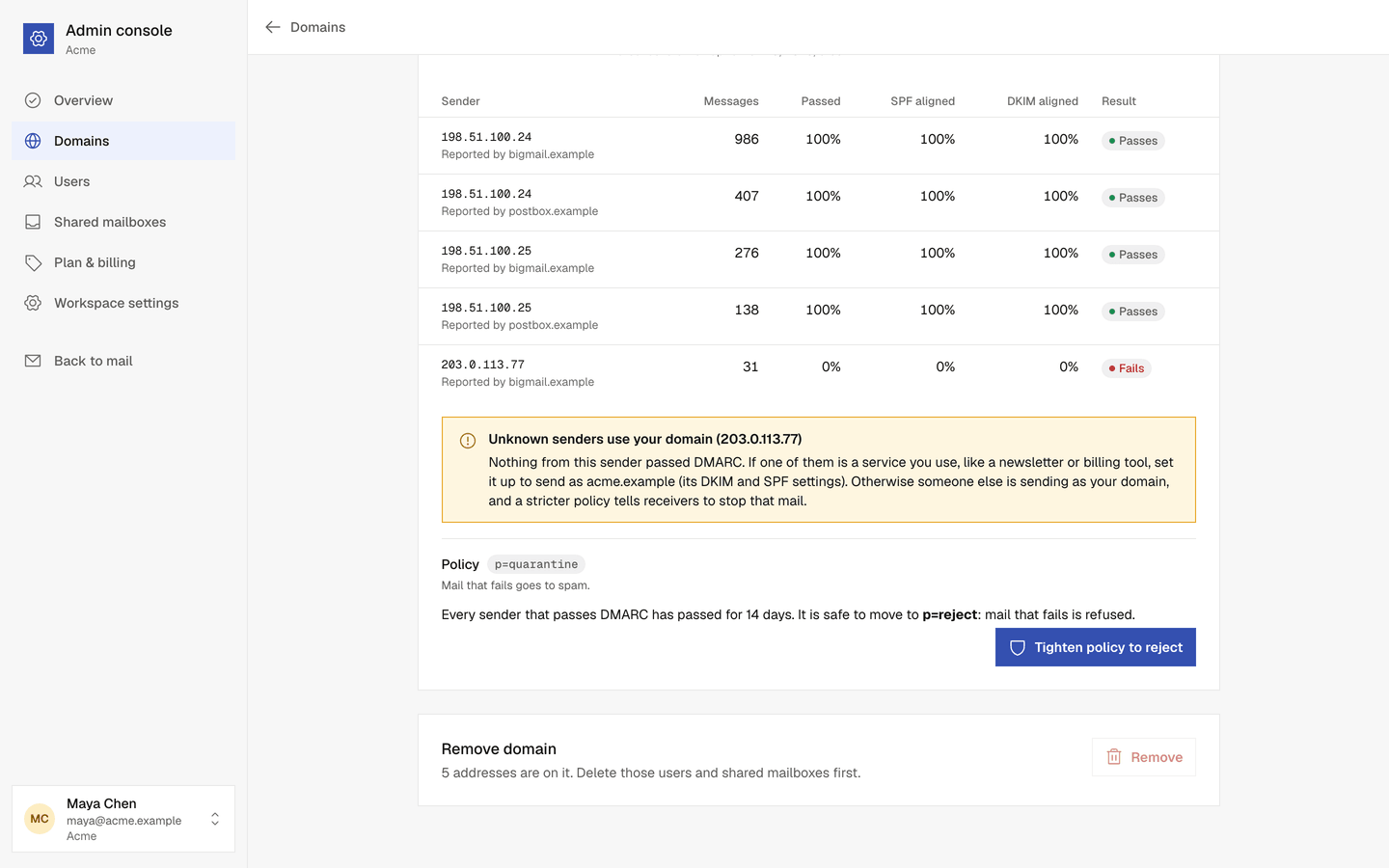
Who sends as you
One row per sending server, with how many messages it sent and how many passed SPF and DKIM for your domain.
A plain verdict
The status line says whether all mail from your domain passes DMARC, or which senders fail. Each server is marked Passes, Partly fails or Fails.
Unknown senders flagged
Servers whose mail never passes are listed as unknown senders, so you can set up a service you forgot, or spot someone pretending to be you.
Tighten when it is safe
After 14 days of reports in which your real mail passes at least 98% of the time, Tighten policy moves you from
p=nonetop=quarantine, then top=reject.Only for admins
The section covers the last 30 days and only admins can see it. Reports are kept for 180 days.
How it works
- 1
Your DMARC record sends reports to us
When you add a domain, its DMARC record asks for reports to come to us. If you already have one, we add our address and keep your policy.
- 2
Reports arrive
Mailbox providers send a report a day or two after mail is sent. Open Admin console → Domains, choose the domain and scroll to DMARC reports.
- 3
Tighten your policy
When it is safe, choose Tighten policy. If your DNS is hosted elsewhere, copy the new record to your DNS host.
Questions, answered
More answers are in the help center, or write to support@onebitmail.com.
What is DMARC?
A DNS record that tells receiving mail services what to do with mail that claims to come from your domain but fails SPF and DKIM. It also asks them to send you daily reports about that mail.
Why do I see No reports yet?
Reports arrive a day or two after mail is sent. Send some mail from the domain and check back in two days.
Will a stricter policy block my own mail?
Not if every service that sends as your domain is set up. That is why Tighten policy is offered only when your real mail has passed at least 98% of the time for 14 days. Check the unknown senders first.
Do I need a separate DMARC tool?
No. Reports for every domain in your workspace are collected and shown in the Admin console, on every plan.
Read more in the help center
- Read your DMARC reportsSee who sends mail as your domain, whether it passes, and when to make your DMARC policy stricter.
- DNS records explainedWhat MX, SPF, DKIM, DMARC and the bounce records do, and why your domain needs each one.
- My sent mail lands in spamWhy your messages end up in the recipient's spam folder, and what you can do about it.
Related features
- Your own domainAdd a domain you own and keep its DNS where it is. One Bit Mail lists every record to add, checks them for you and tells you when something breaks.
- Sending and spam protectionSending limits, a short review for unusual mail, automatic steps when too much mail bounces, a Spam folder for unwanted mail, and no delivery for mail that carries a virus.
Start free,
add your team when you are ready
Every request is reviewed by hand. Approved workspaces start on the free plan.
Request access