A mailbox for every person, a shared address for every team
Each person signs in with their own address and sees only their own mail. Addresses that a team answers together, like support@ or sales@, become shared mailboxes that the people you choose can open.

What it does
Own address, own sign in
Each user signs in with their own address, like jane@acme.com, and their own password, and sees only their own mail.
Shared mailboxes need no sign in
support@ or billing@ has no password of its own. The users you give access see it in their sidebar, next to their own mailbox.
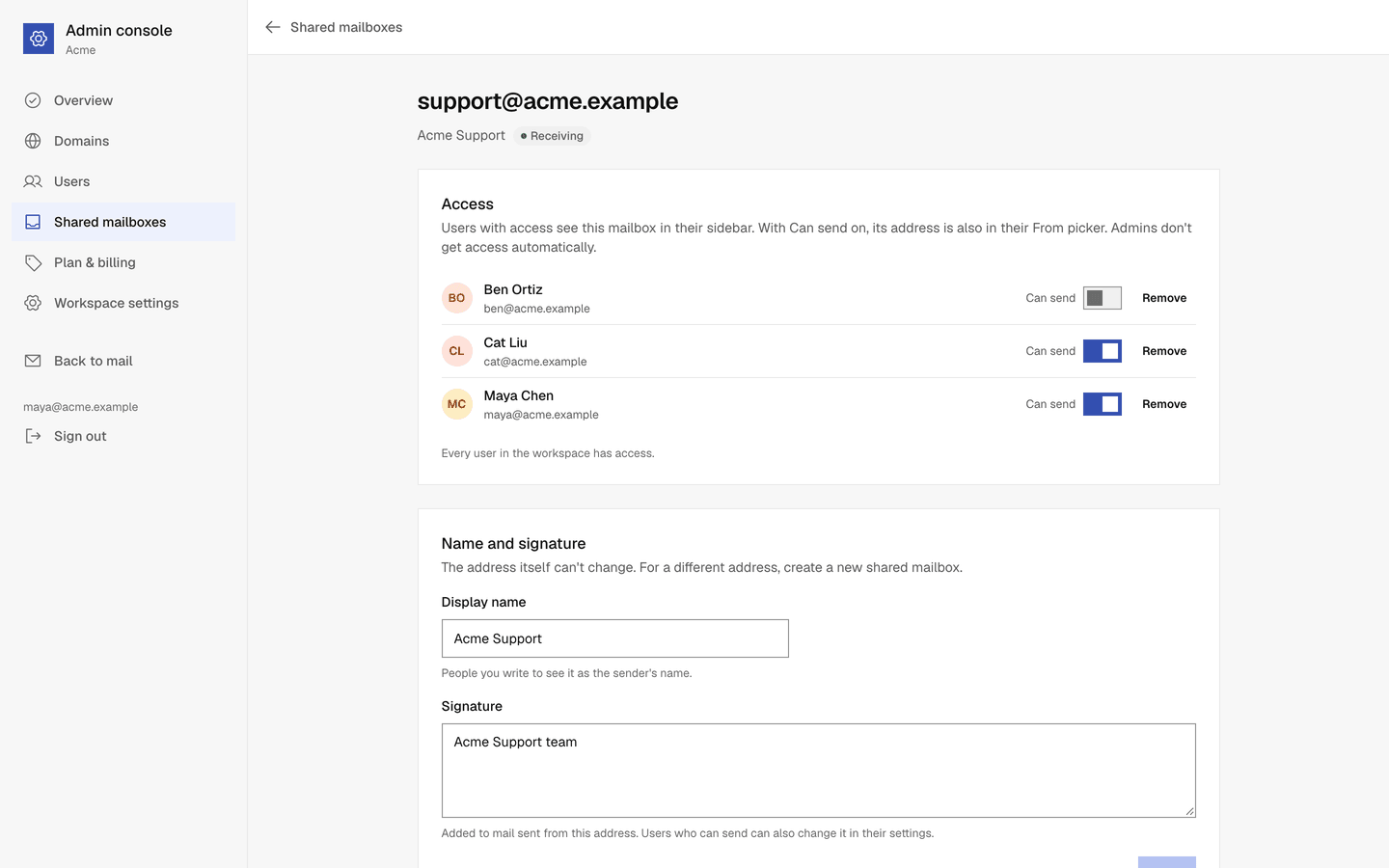
Read, or read and send
For each person, choose whether they can only read a shared mailbox or also send from its address. Change it later with one switch.
One view for the whole team
Everyone with access sees the same messages in the same folders. When one person reads or archives a conversation, the others see that too.
Admins do not read mail
Being an admin does not open other users' mailboxes or shared mailboxes. Admins add themselves to a shared mailbox like anyone else.
A signature per address
Each address you send from can have its own signature, shared mailboxes included.
How it works
- 1
Create the shared mailbox
In Admin console → Shared mailboxes, enter the address and a display name, like Acme Support.
- 2
Give people access
Add users under Access, and tick Can send for those who answer from that address.
- 3
Answer together
The mailbox appears in their sidebar. Its address appears in their From picker when they can send from it.
Questions, answered
More answers are in the help center, or write to support@onebitmail.com.
Does a shared mailbox use up a user?
No. Each plan includes shared mailboxes separately from users. See pricing for the numbers.
Can an admin read everyone's mail?
No. The Admin console never shows mail. An admin reads a shared mailbox only after adding themselves to it, like any other user.
Where does mail sent from a shared mailbox go?
It goes out from the shared address with its display name, and it is saved in the shared mailbox's Sent folder, where everyone with access sees it.
Can I stop a shared mailbox from receiving mail?
Yes. Choose Disable: mail sent to it is refused and the sender gets a bounce, while the stored mail stays. Choose Enable to receive again.
Read more in the help center
- Shared mailboxesCreate addresses like support@ that several users can open, and choose who can send from them.
- Add a userCreate a user with their own address, and give them a temporary password or an invite link.
- How One Bit Mail worksWorkspaces, admins, users, mailboxes and shared mailboxes, and who sees what.
- Find your way around your inboxMailboxes and folders, conversations, read and unread, archive, trash, spam and images.
Related features
- Users and the Admin consoleAdmins add users, reset passwords, sign people out everywhere, set up shared mailboxes and forwarding, and manage the plan, in one place that never shows anyone's mail.
- ForwardingAdmins forward a user's mailbox or a shared mailbox to another address. Keep a copy or forward only, confirmed by the other side, with a list of what went where.
Start free,
add your team when you are ready
Every request is reviewed by hand. Approved workspaces start on the free plan.
Request access